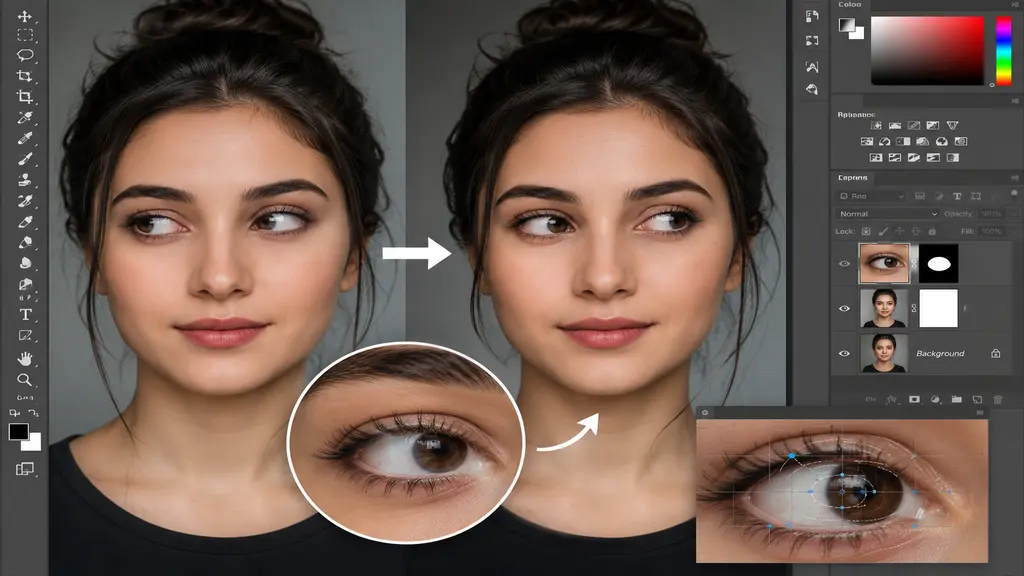
A single small detail, such as the direction of the eyes, can ruin an otherwise excellent portrait. Even a perfectly composed photograph can lose its impact if the subject’s gaze is averted, fixated on the wrong object, or simply appears distracted. Fortunately, Photoshop provides powerful tools that allow for eye direction adjustments while preserving a natural look. For photographers, eCommerce businesses, agencies, and individuals seeking flawless portraits, adjusting eye direction in Photoshop is a highly valuable editing technique. This guide explains how professionals adjust eye direction, why Photoshop remains the industry standard, and how expert editing services can save both time and effort.
Why Eye Direction Matters in Photography
Eye contact helps build a connection between the person in the photo and the person looking at it. When the eyes are positioned properly, portraits feel more interesting, polished, and able to move people emotionally.
A slight eye-direction issue can occur due to:
- Subject movement during the photoshoot
- Camera angle limitations
- Multiple group shots requiring gaze correction
- Commercial photography needing perfect visual focus
- Social media and branding images that demand professional presentation
Even a small adjustment can dramatically improve the final image and increase viewer engagement.
Why Photoshop Is the Best Tool for Eye Direction Adjustment
Adobe Photoshop is widely used by professionals because it offers precise and versatile tools for editing photos. Unlike simpler editing apps, Photoshop lets editors make fine adjustments without losing the quality of the image.
Some key advantages include:
- Pixel-level editing precision
- Advanced layer-based workflow
- Natural-looking retouching capabilities
- High-resolution image preservation
- Professional tools for portrait enhancement
These features make Photoshop the preferred choice for correcting eye direction while maintaining realistic facial expressions and natural eye appearance.

Professional Methods Used to Adjust Eye Direction in Photoshop
Professional editors seldom depend on just one tool. Instead, they merge multiple Photoshop techniques to produce realistic outcomes. A common method involves choosing and repositioning the iris and pupil. Editors meticulously reposition these elements while maintaining the integrity of the surrounding eye structure. This ensures the subject appears to be looking in the intended direction without creating an artificial look. Another approach involves the use of layer masking and transformation tools. By working non-destructively, editors can refine adjustments until the eye position looks entirely natural.
Advanced retouching may also employ digital painting techniques to reconstruct highlights, reflections, and shadows within the eye. These subtle refinements ensure that realism is preserved once the adjustment is finished. The objective is not merely to shift the eyes, but to generate a convincing final image that is indistinguishable from a photograph.
Common Challenges When Adjusting Eye Direction
Eye-direction correction may seem simple, but achieving professional-quality results requires experience and attention to detail.
Some common challenges include:
- Maintaining natural eye symmetry
- Preserving reflections and catchlights
- Avoiding distorted pupil shapes
- Matching both eyes accurately
- Keeping facial expressions realistic
Poorly executed edits often result in unnatural-looking eyes that immediately attract unwanted attention. This is why professional Photoshop expertise is essential for high-quality results.

Benefits of Using a Professional Photoshop Editing Service
Photoshop has strong tools, but getting good at fixing eye direction takes a lot of practice and knowledge. Professional editing services give reliable and exact results without needing you to learn all the skills yourself.
Working with experts offers several advantages:
- Time-saving workflow
- High-quality and natural-looking edits
- Consistent results across multiple images
- Fast turnaround times
- Professional retouching standards
Whether you need portrait enhancements, corporate headshots, model portfolios, or product lifestyle photography, professional Photoshop services ensure every image meets industry standards.
How Our Adjust Eye Direction in Photoshop Service Helps
At our professional Photoshop editing service, we recognize that even minor inaccuracies in eye direction can significantly compromise the quality and impact of a portrait. Our expert editors can meticulously adjust the subject’s gaze to look slightly away, focus on the wrong point, or appear distracted, all while maintaining a completely natural look.
By employing advanced Photoshop techniques, we make precise adjustments to the eyes while preserving the subject’s facial expression and authenticity. Our objective is to generate realistic outcomes that boost viewer engagement and elevate the image’s visual appeal. Skilled professionals meticulously adjust every image, carefully refining eye alignment, reflections, shadows, and facial balance to guarantee a flawless final result.
Our service is perfect for photographers, businesses, agencies, eCommerce brands, and anyone needing high-quality portrait retouching. Whether you require a single image correction or consistent editing for a large batch of photos, we provide accurate and professional results that meet industry standards. By selecting our Adjust Eye Direction service in Photoshop, you can save valuable time, bypass complex editing steps, and deliver polished images that make a lasting impression on your audience.
Conclusion
Eye direction plays a crucial role in creating visually appealing and emotionally engaging photographs. Even minor gaze adjustments can significantly improve the overall impact of an image. Thanks to Photoshop’s advanced editing capabilities, professional editors can correct eye direction while preserving a completely natural appearance. If you’re looking for flawless portrait enhancements, professional eye-direction adjustment services provide the expertise and precision needed to achieve outstanding results. With Photoshop’s industry-leading tools and experienced retouching professionals, your images can look their absolute best.