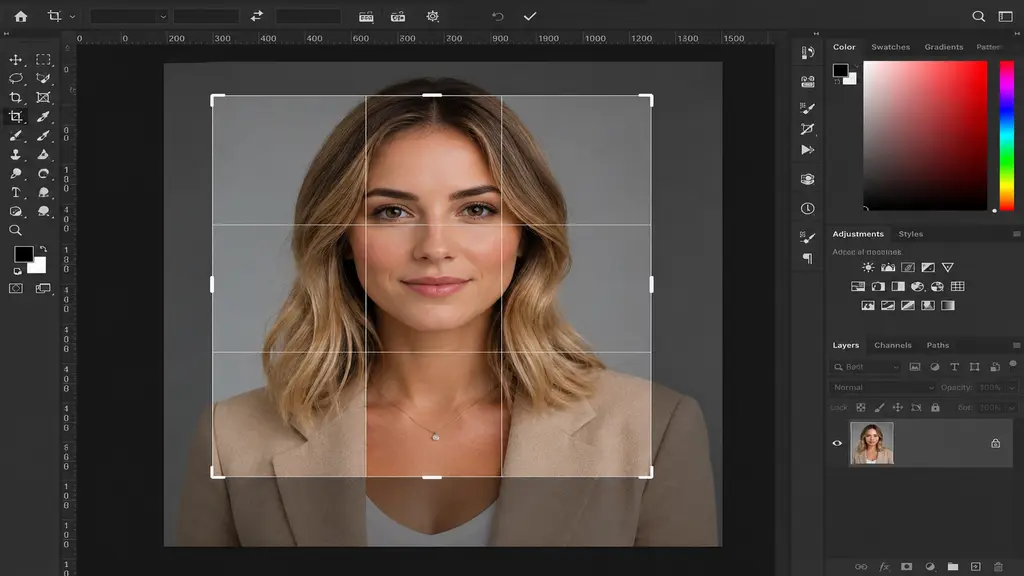
A professional headshot can create a powerful first impression, whether used for LinkedIn, a company website, social media profiles, or personal branding. However, even the finest photograph can lose its impact if it is not cropped properly. Headshot cropping goes beyond merely removing unwanted areas; it guides the viewer’s focus, enhances composition, and yields a polished, professional look. This guide explores the best methods for cropping headshots, covers essential techniques, and explains why Adobe Photoshop remains one of the most effective tools for achieving high-quality results.
Why Proper Headshot Cropping Matters
A well-cropped headshot keeps the viewer’s attention focused on the face. Bad cropping can make an image feel awkward, unbalanced, or unprofessional. Whether for business, marketing, or personal use, proper cropping enhances the visual impact of your photos. When executed properly, headshot cropping can accentuate facial features, eliminate distractions, and enhance the overall composition of the image. This is particularly crucial for professionals who depend on a robust personal brand.

Best Headshot Cropping Techniques
To achieve the most professional results, it’s important to follow a few proven cropping techniques:
- Keep the eyes positioned near the upper third of the image.
- Leave a small amount of space above the head to avoid a cramped appearance.
- Ensure the face occupies a significant portion of the frame.
- Remove distracting background elements whenever possible.
- Maintain a balanced composition that feels natural and professional.
These simple adjustments can dramatically improve the effectiveness of a headshot and make the image more engaging for viewers.
Common Headshot Cropping Mistakes to Avoid
Many people unintentionally reduce the quality of their headshots through improper cropping. Avoiding these common mistakes can help maintain a professional appearance.
- Cropping too close to the forehead or chin.
- Leaving excessive empty space around the subject.
- Cutting off important parts of the shoulders or hair.
- Creating an uneven or tilted composition.
- Using low-resolution crops that reduce image quality.
By paying attention to these details, you can ensure your headshot looks polished and suitable for professional use.

Why Photoshop Is the Best Tool for Headshot Cropping
When it comes to professional headshot editing and cropping, Adobe Photoshop is the industry standard. Although numerous free tools provide basic cropping capabilities, Photoshop offers advanced controls that enable editors to achieve precise, high-quality results. Photoshop allows users to crop images without losing quality, adjust framing with pixel-perfect precision, and refine compositions according to professional photography standards. Furthermore, Photoshop provides robust tools for background removal, retouching, color correction, and image enhancement.
For businesses and professionals needing consistent, high-quality headshots, Photoshop offers a degree of flexibility and precision that simpler editing tools simply cannot match. This is a primary reason why professional headshot cropping services frequently utilize Photoshop to achieve exceptional results.
How Professional Headshot Cropping Services Add Value
Although cropping may seem simple, achieving a truly professional result often requires experience and attention to detail. Professional editors understand facial proportions, visual balance, and platform-specific image requirements.
A professional headshot cropping service can help:
- Create visually balanced compositions.
- Optimize photos for LinkedIn, corporate websites, and social media.
- Maintain image quality and sharpness.
- Remove distractions and improve focus on the subject.
- Deliver consistent results across multiple images.
By using Photoshop and professional editing techniques, these services help individuals and businesses present a more polished and credible image online.

Choosing the Right Crop for Different Platforms
Various platforms may have distinct requirements for headshot dimensions and framing styles. For instance, LinkedIn profile pictures often work best with a tighter crop that highlights the face, whereas corporate websites may prefer a slightly wider shot that captures more of the shoulders. Knowing the image’s intended purpose helps you determine the best crop. Photoshop simplifies the creation of multiple headshot variations while preserving professional quality and consistency.
Conclusion
Cropping is essential to the success of a professional headshot. Selecting the appropriate crop sharpens focus, refines composition, and yields a more impactful visual result. Although numerous tools can handle basic cropping, Adobe Photoshop is the preferred option for professional headshot editing because of its precision, flexibility, and advanced capabilities. To achieve clean, polished, and highly effective headshots, combine professional cropping techniques with Photoshop-based editing. Whether for personal branding, business profiles, or social media, a professionally cropped headshot can significantly boost your online image and credibility.