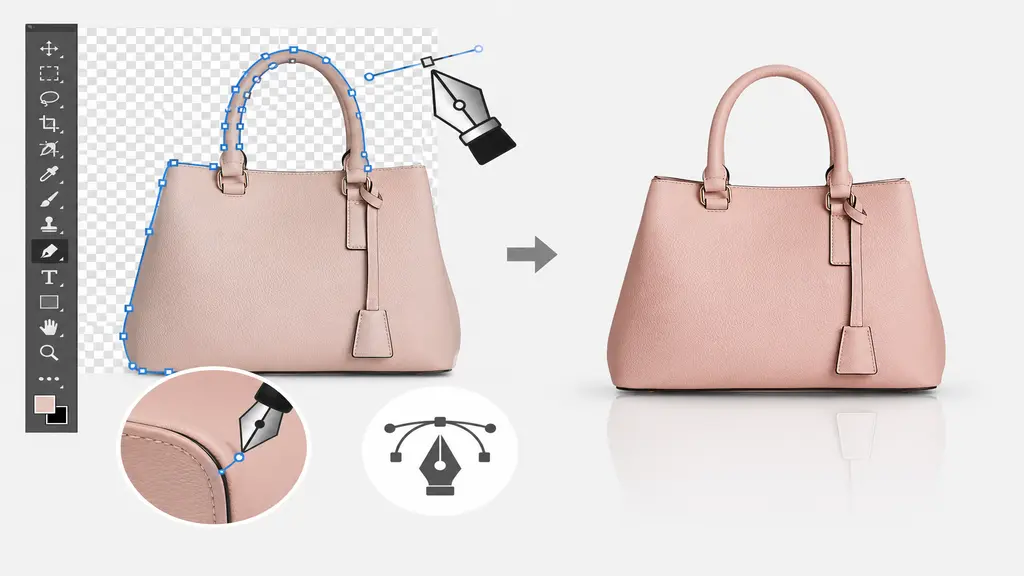
In today’s competitive e-commerce market, product images are very important for drawing customers and boosting sales. A well-edited product image can greatly influence how customers view a brand. Out of all the image editing software available, Adobe Photoshop is still the top choice for e-commerce image editing. One of its strongest tools is the Pen Tool, which helps editors make accurate selections and clean cutouts with high precision. For e-commerce businesses, having clean product backgrounds and clear image edges is crucial. That’s why professional image editing services often use Photoshop’s Pen Tool techniques to provide high-quality product images that fit marketplace requirements.
Why Photoshop is Essential for Ecommerce Image Editing
Photoshop has become the preferred choice for professional image editors because it offers unmatched precision and flexibility. Whether it’s background removal, image masking, shadow creation, or color correction, Photoshop provides all the tools needed to create visually appealing product images. The Pen Tool stands out because it allows editors to create highly accurate paths around products, making it ideal for ecommerce platforms that require clean white backgrounds and professional presentation.
Benefits of using Photoshop for ecommerce image editing include:
- Precise product selection and clipping paths
- High-quality background removal
- Better image consistency across product catalogs
- Enhanced product presentation for online stores
- Professional results suitable for Amazon, Shopify, eBay, and other marketplaces

Understanding the Photoshop Pen Tool
The Photoshop Pen Tool is basically a vector thingy that you use to make paths around objects. Unlike those automatic selection tools, the Pen Tool gives editors, like, total control over every point and curve. It’s way better for tricky images of stuff like jewelry, electronics, clothes, furniture, and, like, other accessories. By making really good paths, editors can cut out products from messy backgrounds and get the images ready for serious ecommerce use. A good clipping path means smooth edges, natural curves, and a polished image that looks totally pro on all those online platforms.
Professional Photoshop Pen Tool Techniques
To achieve the best ecommerce image editing results, professional editors follow several advanced Pen Tool techniques.
1. Creating Accurate Clipping Paths
A clipping path is, like, the base of removing backgrounds properly. Editors put points carefully around the edges of the product, keeping the curves nice and smooth.
Key practices include:
- Using fewer anchor points for smoother paths
- Zooming in for maximum accuracy
- Following natural product contours
- Adjusting handles to create clean curves
Accurate clipping paths help maintain product details and create a flawless appearance.
2. Handling Complex Product Shapes
Some stuff has, like, really complicated edges, curves, or shapes that need extra attention. Professional editors use the Pen Tool carefully to keep all those details while keeping the outlines smooth. Instead of just rushing through it, experienced editors break down complex stuff into smaller bits and carefully fix each one. This makes it more accurate and stops you from getting those jagged edges. The end result is a really clean, natural cutout that makes the product look amazing and gets people to trust your brand.
3. Combining Pen Tool with Other Photoshop Features
Professional ecommerce image editing usually involves more than just paths. The Pen Tool is, like, awesome when you use it with other Photoshop stuff.
Common workflows include:
- Pen Tool + Background Removal
- Pen Tool + Shadow Creation
- Pen Tool + Color Correction
- Pen Tool + Retouching
- Pen Tool + Image Enhancement
By using a bunch of Photoshop techniques together, editors can turn boring product photos into awesome ecommerce images that get people buying stuff.

How Professional Pen Tool Editing Improves Ecommerce Sales
Online shoppers are unable to physically examine products before making a purchase. Consequently, product images have become one of the most significant factors driving purchasing decisions. Professionally edited images help:
- Increase customer confidence
- Improve product visibility
- Enhance brand credibility
- Create a consistent store appearance
- Boost conversion rates
Products with clean backgrounds and sharp edges appear more trustworthy and appealing. This explains why numerous e-commerce enterprises choose to invest in professional Photoshop Pen Tool services.
Conclusion
The Photoshop Pen Tool is still one of the most useful tools for professional ecommerce image editing. It offers precision, flexibility, and the ability to make accurate clipping paths, which are important for creating high-quality product images. Whether you need to remove a background, create a clipping path, or enhance an ecommerce image, Photoshop has the professional tools needed to get great results. By using advanced Pen Tool techniques, businesses can show their products better, improve the customer experience, and eventually boost online sales.